Starter
For small cohorts and pilot programs.
Capacity
...
student accounts
Annual billing
.../year
- Up to 0 teacher accounts
- Flexible classes within the student limit
- Assignments, analytics, and progress tracking

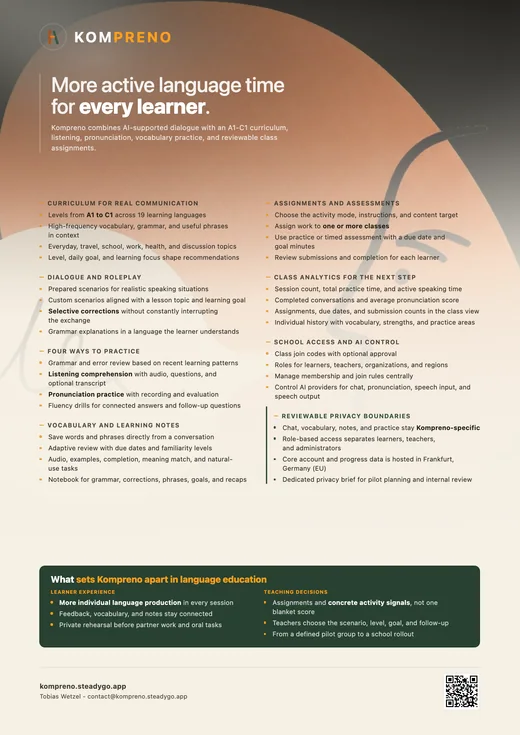
Give every student time to speak, write, and build confidence—before, during, and after class. Teachers set the learning goal; Kompreno provides focused practice and makes the next step easier to see.
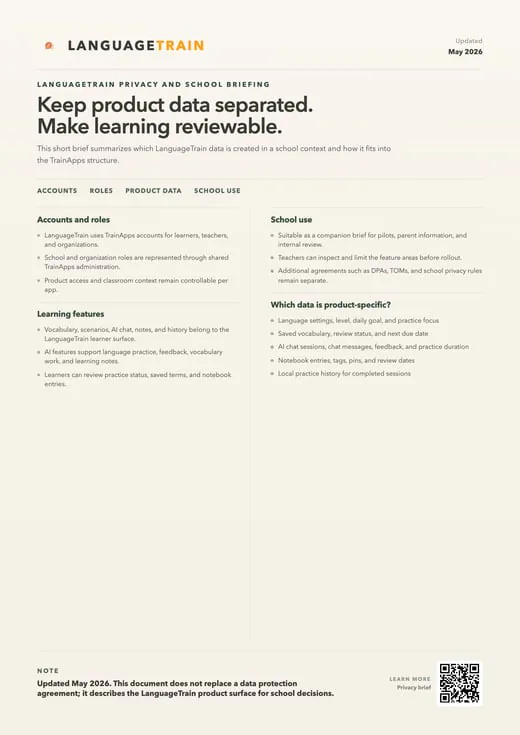
Kompreno privacy brief
Language teachers know that students need far more meaningful output than classroom time can usually provide. In a group discussion, confident speakers can dominate while quieter learners wait, rehearse silently, or avoid the risk of making a mistake. Kompreno gives each student a patient space to produce language around a teacher-relevant scenario, receive immediate feedback, and save useful material.
The classroom does not have to choose between communicative practice and structured learning; conversation becomes the place where vocabulary, grammar, and review meet. The teacher remains responsible for the learning purpose. Scenarios, level, expectations, and follow-up can align with the course rather than being left to a generic chatbot.
Students can prepare for a role-play, consolidate a unit, rehearse language before speaking to a partner, or extend a topic after class. Session results create a clearer picture of what students attempted and where support is needed, while the shared SteadyGo account and organization model keeps access, roles, and rollout consistent with the school’s other learning tools. This creates a practical bridge between limited classroom time and the amount of language use fluency requires.
A teacher can spend the lesson introducing meaning, modelling interaction, listening to students, and addressing shared needs, while individual practice supplies additional turns for formulation and retrieval. The following lesson can draw those attempts back into human communication. Digital practice therefore extends the classroom without pretending to reproduce everything a teacher or peer contributes: relationship, cultural judgment, spontaneous negotiation, humour, and the ability to understand the learner as a whole person.
A strong scenario gives students a reason to use the target language. It may ask them to make a plan, describe an event, compare options, explain an opinion, request help, or respond to information. Teachers can connect that purpose to the current vocabulary and grammar without scripting every sentence.
Students encounter a common communicative challenge, but their answers can vary. This preserves enough structure for classroom follow-up while allowing language to function as communication rather than as a sequence of blanks. Difficulty can be adjusted through the prompt, expected length, available support, and feedback focus.
One learner may use sentence starters and a compact vocabulary set; another may be asked to justify, narrate, or negotiate in greater detail. Both can participate in the same unit and return to a shared discussion afterward. Prepared scenarios also reduce setup time: a useful sequence can be refined, reused, and adapted for another class instead of rebuilding digital practice around each individual lesson.
Scenarios work best when students know what success means. A teacher may emphasize comprehensibility, use of target phrases, follow-up questions, accuracy in one structure, or willingness to elaborate. Making that focus explicit prevents the AI conversation from becoming a vague activity whose educational purpose is unclear.
The recap can then support reflection: which language helped the exchange continue, where did support become necessary, and what would the student change next time? Those questions carry the digital session back into classroom dialogue and learner agency.
In whole-class conversation, airtime is limited and mistakes can feel public. Individual AI-supported practice creates another layer of participation. Students can pause, reformulate, consult a suggestion, and continue without holding up the group.
This is particularly useful before pair work or oral assessment: learners arrive having already retrieved the relevant language and confronted the places where expression becomes difficult. The tool does not replace human interaction; it helps more students enter that interaction ready to contribute. Teachers can set expectations that protect productive effort.
Support should help a student continue, not generate a polished answer to submit without understanding. By keeping prompts, feedback, saved vocabulary, and session recap visible, Kompreno makes the learning process easier to discuss. A teacher can ask what the student changed, which phrase they saved, or which explanation helped.
The conversation becomes evidence of practice and reflection rather than a hidden exchange whose educational value is impossible to judge. Participation can also be sequenced socially. Students might begin alone, compare one saved expression with a partner, repeat the scenario face to face, and finally share a strategy with the class.
The private rehearsal lowers the cost of the first attempt; the human interaction adds unpredictability, listening, gesture, and relationship. Used this way, Kompreno is not an alternative to classroom communication. It is a preparation and reflection layer that helps more learners arrive with language ready enough to take part.
Individual corrections become more valuable when they reveal a class pattern. If many students avoid the past tense, misuse a preposition, or rely on the same limited vocabulary, the teacher has a concrete reason to revisit the form. Kompreno can organize session information around the language being practiced so that feedback does not disappear when the chat closes.
The next lesson can begin with authentic examples, a short comparison, or a scenario that gives the class another opportunity to apply the improved pattern. Students can review personally relevant material without repeating an entire unit. Saved phrases, grammar lessons, and focused prompts let a learner work on a narrow need while staying connected to the common curriculum.
Progress is therefore useful at two scales: the class view supports planning, and the individual view supports a specific next step. Neither needs to reduce language ability to one score. Teachers can combine the evidence with classroom observation, spoken interaction, written work, and professional judgment.
This evidence can make feedback conversations more precise. Instead of telling a student to improve grammar in general, a teacher can identify a recurring pattern and agree on one communicative situation in which to practise it. Instead of asking a confident learner simply to do more, the next scenario can demand a richer register, a longer explanation, or more responsive follow-up.
The technology contributes observations; the teacher decides which observation matters, how it relates to the curriculum, and what kind of human support will help the learner act on it.
School use of AI requires more than an engaging demonstration. Leaders and teachers need to understand which data the product creates, how roles and access work, what remains specific to Kompreno, and how the tool fits the school’s policies. The school-facing privacy brief maps learning profiles, vocabulary, grammar lessons, chat sessions, and local history to the shared SteadyGo organization model.
This gives internal reviewers a concrete product surface to evaluate instead of relying on broad claims about AI in education. A pilot can begin with a defined group, scenario, and review period. Teachers can agree on appropriate use, explain the workflow to students, collect classroom evidence, and decide what wider adoption would require.
Shared accounts and administration make expansion predictable, while product-specific boundaries keep language-learning data distinguishable from other apps. The goal is not to introduce AI everywhere at once. It is to create a transparent, teachable practice environment in which more students use language actively and the school can explain how that learning is supported.
Professional learning belongs in that rollout. Teachers need time to examine sample conversations, decide what feedback is appropriate for their subject and age group, and establish how AI-supported work will be discussed or assessed. Administrators need a clear route for questions about access, deletion, and product responsibility.
Students need guidance on verification, authorship, and when to ask a person instead. Treating these as design decisions rather than afterthoughts creates trust and makes it more likely that the tool will support consistent teaching practice instead of becoming an isolated experiment.
Kompreno’s class view turns activity into a small set of concrete teaching signals. For a selected class, the implemented analytics show session count, total practice minutes, speaking minutes, completed conversations and an average pronunciation score when pronunciation data exists. The same view lists assignments with their activity mode, due date and number of submissions.
These measures do not claim to grade overall language ability. They answer narrower questions that help with planning: did students practise, did they spend time producing language, did they complete the intended conversation, and is there pronunciation evidence worth revisiting? A teacher can combine those signals with the actual classroom interaction, written work and professional judgment.
The result is a next step tied to an observable activity rather than a vague promise that an AI conversation automatically equals learning.
School administration is part of the implemented Kompreno workflow, not an imagined future layer. SteadyGo organizations contain classes, teachers and students; classes have join codes and can require approval before a student enters. Organization and region administrators can manage membership and choose whether teacher or student joins are approved automatically or held as pending.
Kompreno stores its vocabulary, practice sessions, assignments, assignment submissions, chat messages and grammar lessons in product-owned tables, while using the shared account and organization model. The app also defines organization- or region-scoped AI provider settings for chat, pronunciation, speech-to-text and text-to-speech. A responsible pilot can therefore specify who participates, which activity is assigned, what data the activity creates, which AI features are in scope, how teachers review the result and what would justify broader use.
School pricing
Choose the plan by learner capacity. Starter and School can be activated directly; larger institution rollouts can be planned with us.
For small cohorts and pilot programs.
Capacity
...
student accounts
Annual billing
For schools running regular classroom practice.
Capacity
...
student accounts
Annual billing
Price
Need help choosing a Kompreno plan?
Create a free institution account now. You can add billing later from the admin billing page.
Sign up for a free account today and explore all features. No credit card required.
Create Institution→